
Speed Up SharePoint Speed Up SharePoint

SharePoint Scaling Limitations for Law Firms

Legal document growth and discovery demands expose SharePoint scaling limits faster than most industries.

Contact Us

Law firm performance issues are rarely caused by user behavior — they are structural.

Schedule Technical Review

Why Law Firms Hit SharePoint Limits Early

Law firms generate exceptionally high document volumes through litigation, discovery, transactional work, and regulatory retention requirements. SharePoint environments in legal organizations often scale faster than originally planned.

Common Legal-Specific Pressure Points

Security Trimming at Scale

Legal environments rely heavily on item-level permissions. At scale, permission trimming becomes a dominant performance cost during search, navigation, and bulk operations.

Architectural Reality

SharePoint works best as a governed document authority. High-volume discovery, analytics, and reporting workloads require complementary systems designed for scale.

High-Level Enterprise SharePoint Architecture
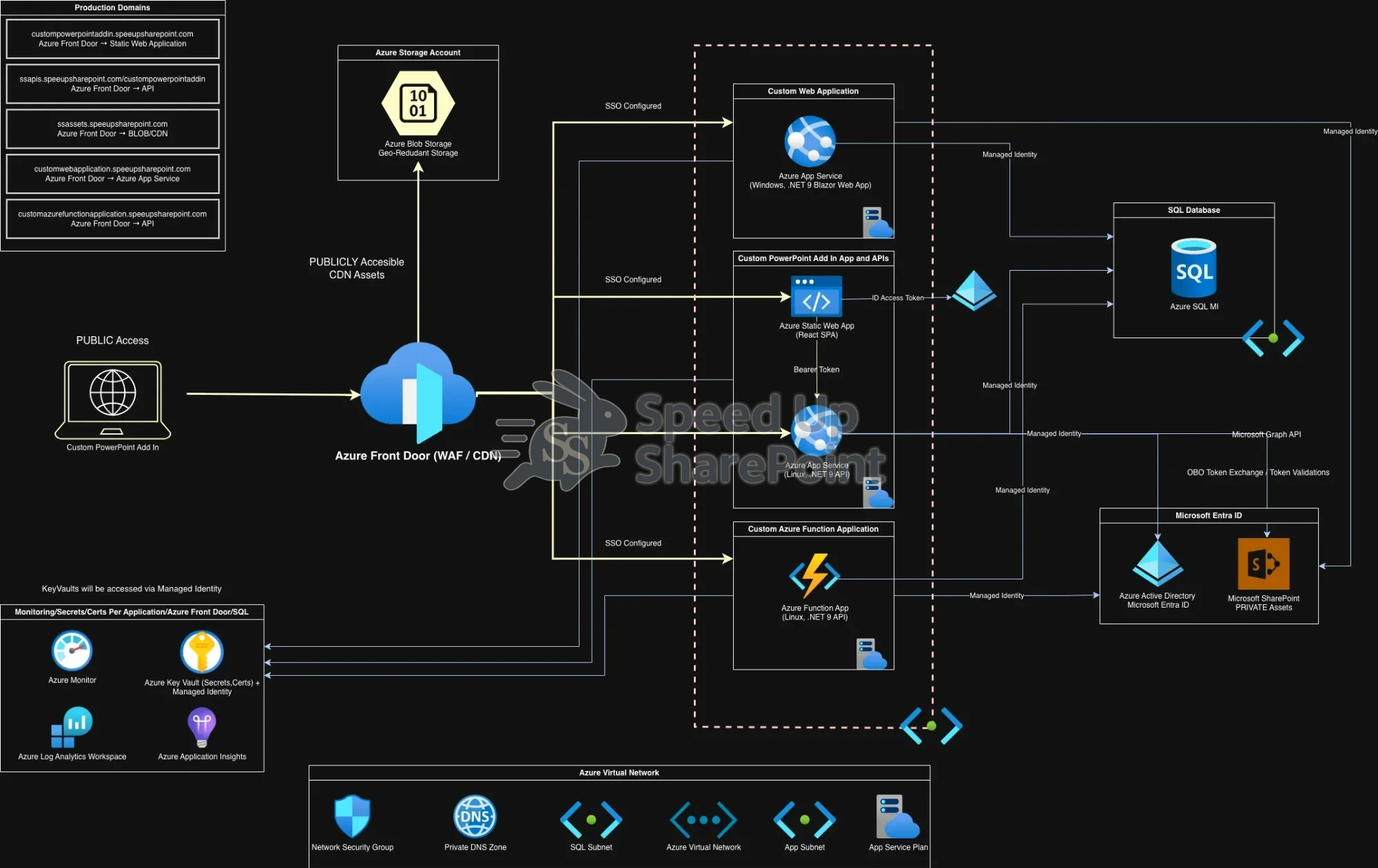
Enterprise SharePoint architecture using Azure Front Door, App Services, Azure Functions, Blob Storage, and Azure SQL for scalable performance
Enterprise SharePoint architecture separating edge, application, data, and security layers for performance and scale.
Click to view full-size diagram.

Calculate Your Productivity Loss

Enter your firm's staff counts and average hourly rates below. The calculator will show you the monthly and annual cost impact of productivity loss due to SharePoint performance issues across all attorney and staff roles.

Associates

Partners

Of Counsel/Senior Counsel

Counsel (Non-Partner)

Staff/Contract Attorneys

Law Clerks

General Attorneys

Knowledge Management

Practice Management (Attorney)

Hours Lost / Month Associates Partners Of Counsel Counsel Staff Attorneys Law Clerks General Attorneys Knowledge Mgmt Practice Mgmt Total Monthly Cost Annualized Cost

Contact Us

Call or email today for a technical consultation. Enterprise bottlenecks won’t fix themselves.

Speed Up SharePoint

(818) 209-1548

[email protected]
Accessibility
Seizure Safe Clear flashes & colors
Eliminates flashing content
Vision Impaired Enhances visuals
Adjusts site for visual impairments
ADHD Friendly More focus
Reduces distractions
Cognitive Disability Assists with reading
Helps cognitive focus
Keyboard Navigation Use keyboard
Full keyboard operation
Screen Reader Optimize for screen-readers
Screen-reader compatibility
Content Scaling
0%
Readable Font
Highlight Titles
Highlight Links
Text Magnifier
Adjust Font Size
0%
Adjust Line Height
0%
Adjust Letter Spacing
0%
Dark Contrast
Light Contrast
High Contrast
High Saturation
Monochrome
Title Color
Text Color
Background Color
Mute Sounds
Hide Images
Read Mode
Reading Guide
Stop Animations
Highlight Hover
Highlight Focus
Big Black Cursor
Big White Cursor

⚠️ Don't need accessibility features?

You can permanently hide this widget. This will remove the accessibility button from all pages until you clear your browser data.